
For Subscribers
Transfer Ownership 🤝🏻
Want to hand over responsibility for your Gumb community, including the subscription, to someone else, for example when your board changes? You won't lose any data: communities, members, events, chats and content all stay as they are.
Before you start
- Each community has exactly one owner, who pays for and manages the subscription.
- The new owner needs their own active subscription. Only then can we switch ownership.
- Start the transfer a few days before the current subscription renews so you don't pay twice.
Tip: Make the new person an admin of the community beforehand. That gives them all management rights right away. More: Roles and permissions 🛂
How the transfer works
1. New owner: subscribe
The new person logs in to the web app with the account that should become the owner. They open Profile > Subscription and subscribe under Choose plan. The easiest option is the same plan and tier as before. How it works: Start Your Gumb Subscription 🚀
2. Send us a short note
Email support@gumb.app with both email addresses: the current owner's and the new owner's. As soon as the new subscription is active, we transfer ownership.
3. Current owner: cancel the subscription
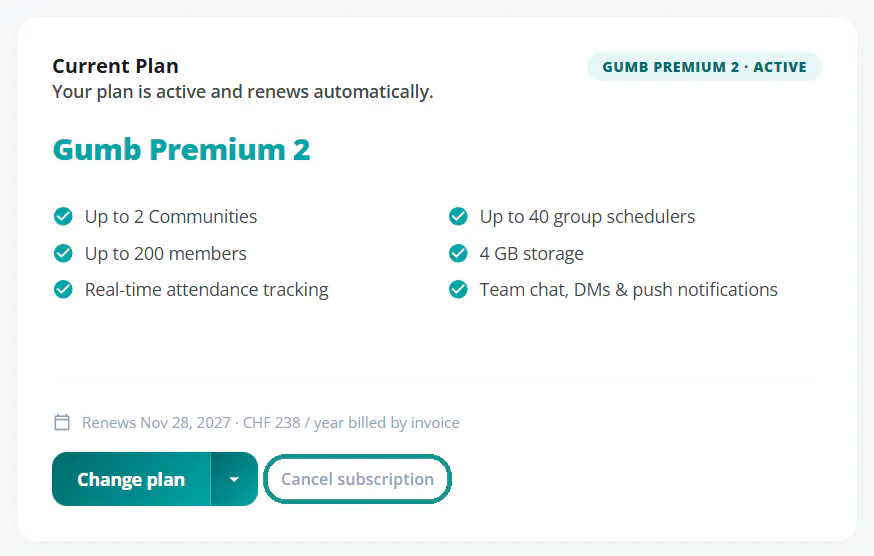
So the current subscription doesn't renew, the current owner cancels it under Profile > Subscription with Cancel subscription. The community's data stays intact. How it works: Canceling Your Subscription 💔
FAQ
Will we lose any data?
No. All of the community's content stays when ownership changes.
Can someone become owner without their own subscription?
No. Ownership is tied to the new account's subscription.
Why does the current owner need to cancel?
Otherwise their subscription renews automatically and you pay twice.
What if the current subscription has already renewed?
Email us right away at support@gumb.app. We'll help you with the handover.