
For Subscribers
Subscription & Billing: Overview 💶
The owner of a community takes out the Gumb subscription. Members and admins pay nothing. You manage it only in the web app under Profile > Subscription.
Who pays for Gumb?
Only the community owner 👑. Each community has exactly one owner, who starts and manages the subscription. Members and admins use Gumb for free.
You can see who your owner is under My Communities. To change the owner: Transfer Ownership 🤝🏼
Where do I manage my subscription?
In the web app under Profile > Subscription. The iOS and Android apps have no subscription settings.
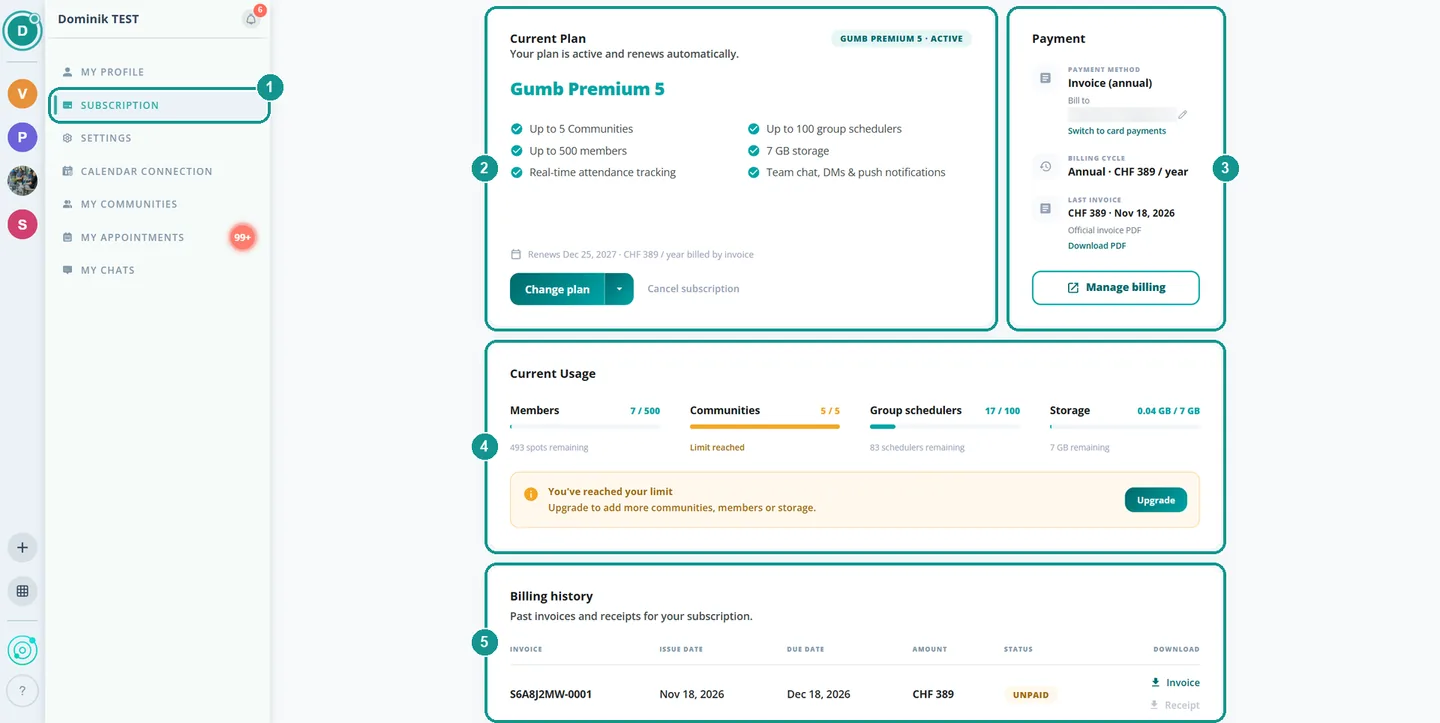
- 1 Subscription: in the profile menu on the left.
- 2 Current Plan: which plan is active and until when. Choose, change or cancel it here.
- 3 Payment: payment method, billing cycle and your latest invoice.
- 4 Current Usage: members, communities, group schedulers and storage against your limits.
- 5 Billing history: every invoice and receipt as a PDF.
Which plans are there?
New communities start with a free trial: 2 months free, no credit card. It ends on its own and nothing is charged. After that, pick Pro for 1 community, Premium for 2 to 30 communities, or Enterprise for larger organizations.
All prices: Pricing & Plans. Not sure which one fits? Which Plan Fits? 💼
How can I pay?
By card (Visa, Mastercard), TWINT (in CHF), SEPA (in EUR) or invoice with 30 days to pay. You pay monthly or yearly, and yearly costs less. More: Payment Methods & Currencies 💳
Which currency do I pay in?
Your billing country sets the currency, and Gumb detects it automatically: CHF for Switzerland and Liechtenstein, EUR for euro countries, USD for all other countries.
How do I get my invoice?
By email, to you and to anyone else you add, such as your treasurer. In CHF it's a QR-bill, in EUR and USD it's an invoice with a payment link. Every invoice and receipt is under Billing history. More: Invoices, Receipts & Recipients 📧
Does my subscription renew automatically?
Yes, monthly or yearly on the same date, until you cancel. Before every renewal, we remind you in Gumb and by email.
Can I cancel anytime?
Yes, online under Profile > Subscription > Cancel subscription. Your plan stays active until the end of the paid period and your data is kept. There's no refund for the remaining time. You can undo the cancellation until the period ends. More: Canceling Your Subscription 💔