
For Subscribers
Invoices, Receipts & Recipients 📧
You'll find every invoice and receipt for your subscription in the web app under Profile > Subscription. That's also where you choose who gets the invoices by email, such as your treasurer.
Where do I find our invoices?
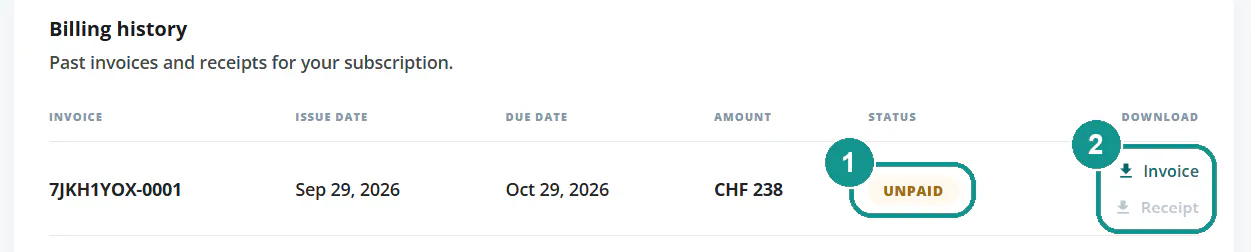
At the bottom of Profile > Subscription under Billing history. Every invoice is listed with its number, date, due date and amount:
- Status: whether an invoice is still open or already paid.
- Download: the invoice and receipt as PDFs.
Your latest invoice is also in the Payment section under Download PDF.
What's the difference between an invoice and a receipt?
The invoice shows what you need to pay. The receipt confirms that you've paid. The receipt is available once your payment arrives, so right away for card payments. You also get both by email.
How do I add invoice recipients?
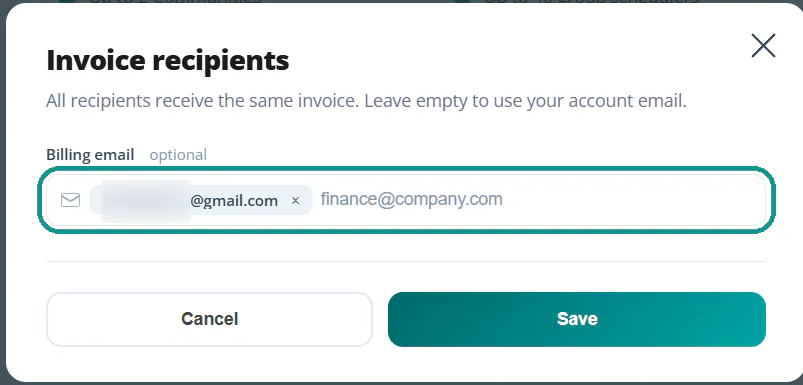
By default, the invoice goes to your account's email address. To send it to your treasurer or accounting team too:
- Open Profile > Subscription and go to the Payment section.
- Click the pencil next to Bill to.
- Add the email addresses.
- Click Save.
Every recipient gets the same invoice. If you leave the field empty, it only goes to you.
What do recipients get?
An email from Gumb with the plan, amount, due date and invoice number. The View invoice button opens the invoice directly. This doesn't give them access to your subscription or communities.
How do I change the name, address or email on the invoice?
In the Payment section, click Manage billing. On Stripe's secure page, you can update your name, email and billing address. Changes apply from your next invoice. If an invoice that's already been issued needs a correction, or you want to change your invoice memo or VAT number afterwards, write to us through the contact form.
Invoices for reimbursement
Paying for the subscription yourself and getting reimbursed by your organization? Download the invoice and receipt and pass them to your treasurer. Or add your treasurer as an invoice recipient right away.
Older payments through PayPal
Payments before August 2026 went through PayPal. You'll find those receipts in your PayPal account and in PayPal's emails.