For Subscribers
Pay by Invoice 🧾
You can pay for your Gumb subscription by invoice instead of paying by card right away. Your subscription is active immediately, and you have 30 days to pay. In CHF you get a QR-bill, in EUR and USD an invoice with a payment link.
How to order by invoice
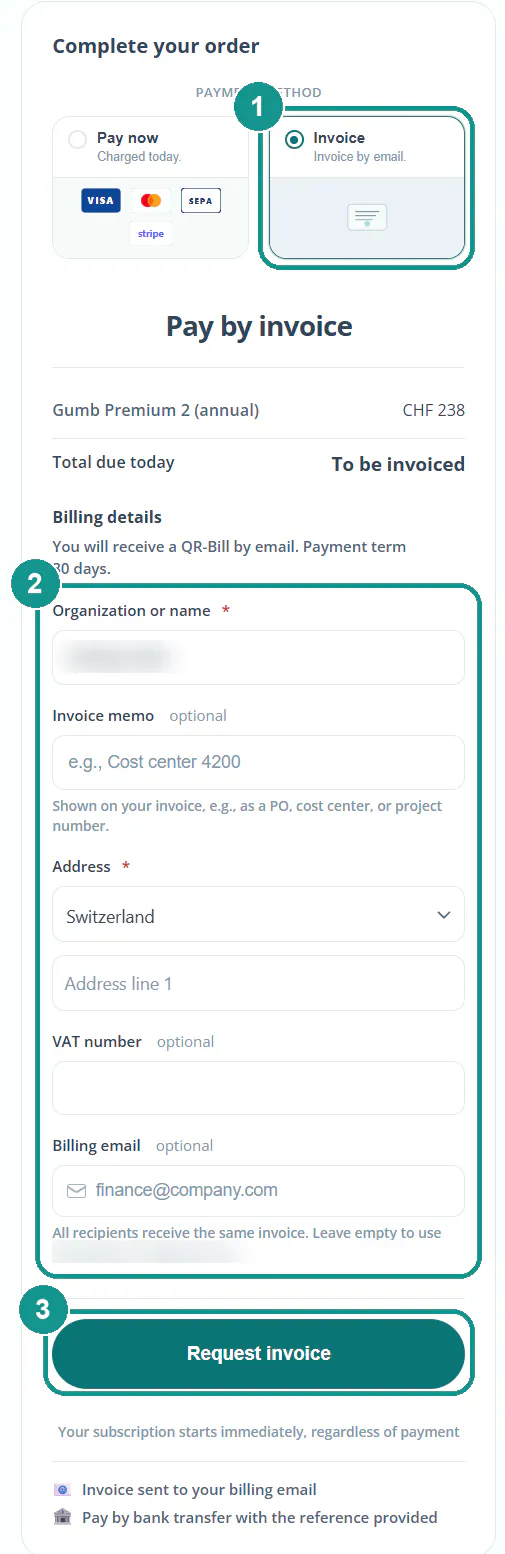
- Open Profile > Subscription, click Choose plan, then pick your plan and tier.
- Under payment method, choose Invoice (1).
- Fill in the billing details (2). Your organization or name and your address are required. Optional: an invoice memo like a cost center or PO number, a VAT number and more billing emails.
- Click Request invoice (3).
Your plan is active right away, even while the invoice is still open.
What's on the invoice?
The invoice number, issue date, due date, your plan with its service period and the amount. Your invoice memo shows up too. If you order during your free trial, the trial appears at CHF 0 and the paid period starts after it. No VAT is charged, since Gumb AG isn't registered for VAT.
How do I pay the invoice?
- In CHF: scan the QR code on the payment slip with your e-banking or banking app. The payment reference is in the QR code, so there's nothing to type.
- In EUR and USD: click View invoice in the email and pay online through the payment link.
Who gets the invoice?
You and every invoice recipient you added. They get an email from Gumb with the plan, amount, due date and a View invoice button. You can add recipients later too: Payment Methods & Currencies 💳
How can I tell if the invoice is paid?
Under Profile > Subscription in Billing history. Open invoices are marked Unpaid. Once your payment arrives, the status changes and you can download the receipt.
What happens at renewal?
Before every renewal, we remind you in Gumb and by email. The new invoice arrives automatically by email, again with 30 days to pay.
What if we don't pay on time?
If the invoice is still open after the due date, we'll remind you by email. If it stays unpaid for longer, access to your communities is paused. As soon as your payment arrives, everything is unlocked again automatically, and your data stays as it is.
Wrong details on the invoice?
You can update your billing address yourself under Manage billing. It applies from your next invoice. If an invoice that's already been issued needs a correction, write to us through the contact form. In exceptional cases we can adjust it.
Prefer to pay by card?
You can switch to card payments anytime. It applies from your next billing cycle. More: Payment Methods & Currencies 💳