For Subscribers
Payment Methods & Currencies 💳
You can pay for your Gumb subscription by card, TWINT, SEPA or invoice. Your currency depends on your billing country. All payments are processed securely by our payment provider, Stripe.
Which payment methods are there?
Pay now: you're charged at checkout and then automatically at every renewal. Depending on your currency, you can choose:
- In every currency: credit or debit card (Visa, Mastercard), Apple Pay and Google Pay on supported devices, and Link by Stripe
- In CHF, also: TWINT
- In EUR, also: SEPA Direct Debit, and EPS in Austria
Invoice: you get the invoice by email and have 30 days to pay. Your subscription is active right away.
You pick the payment method at checkout. How it works: Start Your Gumb Subscription 🚀
Which currency do I pay in?
Your billing country sets the currency, and Gumb detects it automatically:
- Switzerland and Liechtenstein: CHF
- Euro countries: EUR
- All other countries: USD
Prices in each currency are on Pricing & Plans. If the currency looks wrong, check your billing address under Manage billing or contact us.
How do I pay an invoice?
- In CHF, you get a QR-bill. Open your e-banking or banking app and scan the QR code on the payment slip.
- In EUR and USD, you get an invoice with a payment link. Use the link to pay online.
Every invoice is also under Profile > Subscription in Billing history. You'll find the receipt there once you've paid.
Can the invoice go straight to our treasurer?
Yes. Under Profile > Subscription, in the Payment section, click the pencil next to Bill to. Add the email addresses, such as your treasurer's, and click Save. Every recipient gets the same invoice. If you leave the field empty, the invoice goes to your account's email address.
Is VAT charged?
No. Gumb AG isn't registered for VAT, so your invoices don't include any.
Where can I see my payment method?
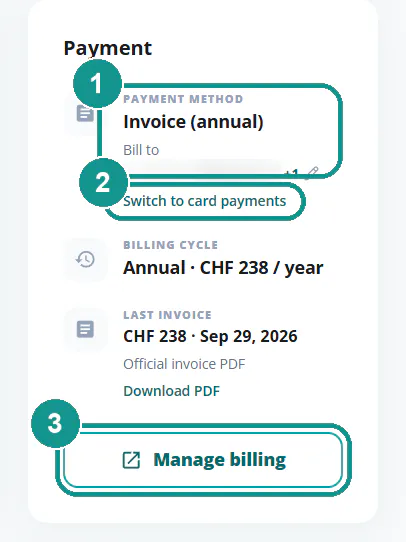
Under Profile > Subscription in the Payment section:
- Payment method: how you pay and who gets the invoice.
- Switch to card payments: move from invoice to card.
- Manage billing: opens the secure Stripe page, where you can update your card, name, email and billing address.
How do I change my payment method?
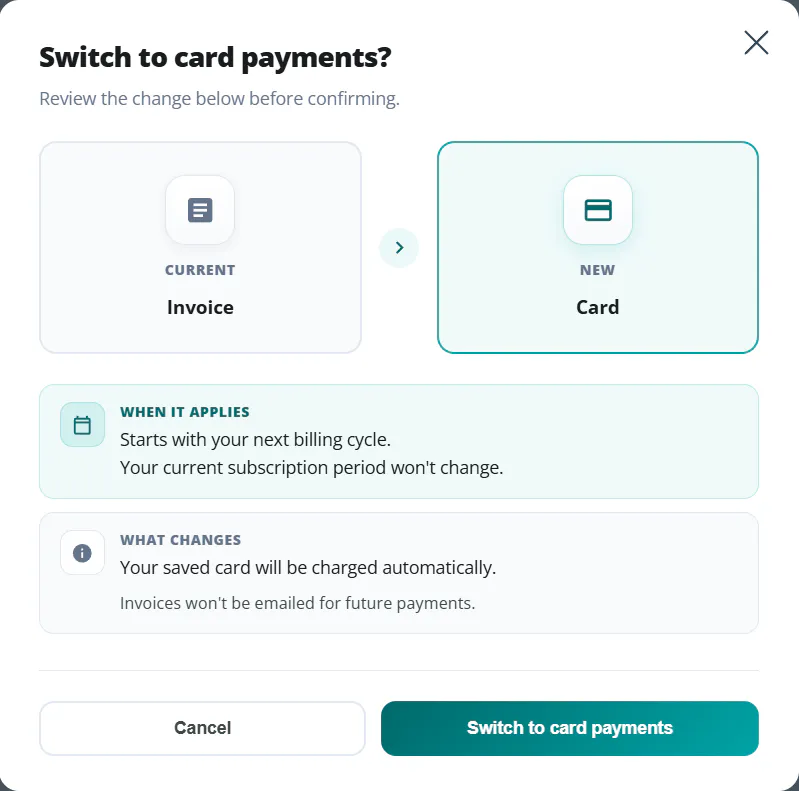
Under Profile > Subscription, the Payment section has a link right below your payment method to switch, for example Switch to card payments. The switch applies from your next billing cycle, and your current subscription period stays the same. If you switch to card, your saved card is charged automatically from then on and invoices are no longer emailed. If a switch doesn't work, write to us through the contact form.
I used to pay with PayPal
Since August 2026, all payments run through Stripe, and PayPal is no longer available. We've already ended your old PayPal subscription, so there's nothing to do there. Your Gumb subscription continues at the same price, with the same term and renewal date. As the owner, you only need to add a new payment method under Profile > Subscription. We'll remind you in Gumb and by email 30 days before your renewal.
Trouble with a payment?
The payment form won't open or a payment failed? See Payment or Subscription Issues ❓