
Troubleshooting
Payment or Subscription Issues ❓
If a payment fails, Gumb shows the owner a notice at the top of the web app with the right button. Here's what each notice means and what you can do. All payments run through our payment provider Stripe.
What does "We couldn't process your last payment" mean?
Stripe couldn't charge the amount. Usually the card has expired, the card limit is reached or the confirmation in the banking app is missing.
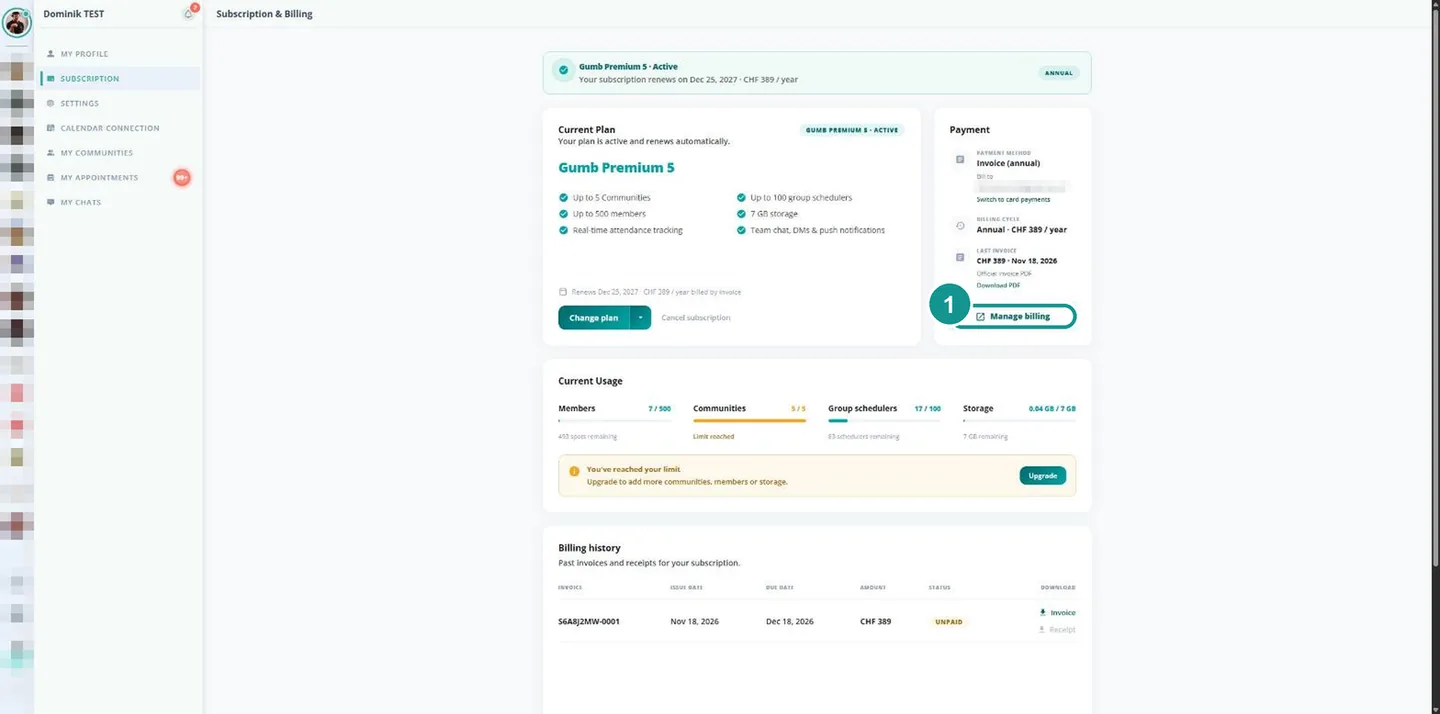
- In the notice, click Update payment method. Or open Profile > Subscription and click Manage billing (1).
- On the Stripe page, add a valid card and remove the old one.
- Confirm the payment if your bank asks for it.
Stripe then retries the payment. You fix the notice Payment method required the same way: there's no valid payment method on file yet.
What does "Your account has an unpaid balance" mean?
Several charges have failed, and your access is limited until the amount is paid. In the notice, click Update billing and add a valid payment method. Everything is unlocked again right after.
What does "You have an overdue invoice" mean?
You pay by invoice, and the 30-day payment term has passed. Click Pay invoice or pay the invoice from the email: in CHF with the QR code in your e-banking, in EUR and USD through the payment link. Already paid? Send us the receipt at support@gumb.app.
Why was my card declined?
Common reasons are an expired card, a reached card limit or a confirmation in the banking app that wasn't completed. Check the card details and confirm the payment with your bank. Or choose another payment method: TWINT in CHF, SEPA Direct Debit in EUR or invoice. All payment methods: Payment Methods & Currencies 💳
Card expired: where do I change the payment method?
Under Profile > Subscription, click Manage billing. On the Stripe page, add the new card and delete the old one. Stripe then retries any open payment automatically.
What does "Payment not completed" mean?
You closed the Stripe payment page before the payment was finished. Nothing was charged, and your subscription is unchanged. Start the payment again under Profile > Subscription with Choose plan or Change plan.
Paid, but the subscription isn't active. Why?
- Wait a moment: After the payment, Gumb needs up to a minute to activate the subscription. Then reload the page.
- Wrong account: Only the owner's account activates the subscription for the community. You can see who your owner is under My communities. If someone paid with a different account, write to us and we'll switch it. More on this: Transfer Ownership 🤝🏼
Where do I find my invoice?
Check your spam folder first. All invoices and receipts are also at the bottom of Profile > Subscription under Billing history. If the invoice should also go to another address, e.g. your treasurer: Invoices, Receipts & Recipients 📧
More help
If none of this helps, write to us through the contact form or at support@gumb.app.