
FAQs
Can I cancel an event instead of deleting it? 🔴
Yes. Gumb has no separate cancel button, but you switch the event to a red event type "Cancelled". The event stays in the Scheduler, and everyone invited gets your message. Deleting only makes sense for events that should never have existed.
What is the difference between cancelling and deleting?
- Cancel The event stays in the Scheduler in red, with your message.
- Delete The event disappears completely, with all responses and comments.
Anyone who misses the notification still sees that a cancelled event is off. A deleted event is simply gone, and they might show up anyway.
How do I cancel an event?
- Create an event type "Cancelled" in red once: Create Event Types 🎫
- Click the event in the Scheduler, then Edit, and choose "Cancelled" as the Event type.
- Optional: set Set default response for all to "I won't attend". All responses turn red at once.
- Click Update event, write the reason in the message, e.g. "Called off due to rain", and click Send.
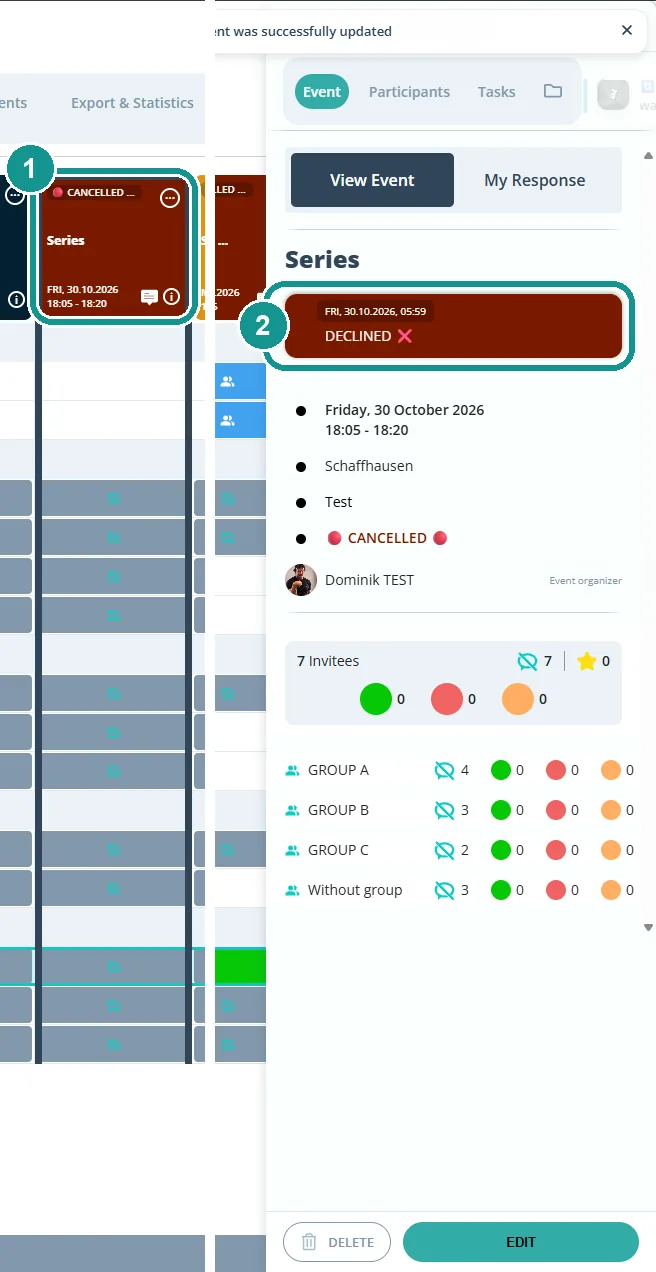
The event now shows up red in the Scheduler, with a speech bubble for the message (1). In the details, the message appears in the red box (2). Step by step with pictures: Scheduling: Create Events 🗓️
Who gets notified?
Everyone invited, if you click Send when you save. Whether the message arrives in the app, by email or by push depends on your notification settings. Under Event updated, the field Event type has to be selected. More: Automate Notifications 📳
Can I cancel a whole series of events?
Yes. If the event belongs to a series, Gumb asks when you save: This event, This and following events or All events. If your meetings stop after the holidays, for example, choose This and following events.
Do cancelled events count in the statistics?
They stay in Export & Statistics, with the event type "Cancelled". Use the Event type filter to leave them out. Deleted events are missing there entirely. More: Export Attendance and Statistics 📊
When should I delete an event anyway?
When it was created by mistake or twice. Click the event, then Delete, and confirm with OK. Gumb then asks whether to notify the people invited, with a message if you like.