
Event · Sign-up · Team
The app for company events and team outings
Plan company events, team outings and offsites, see RSVPs in real time and track attendance automatically. For organizers, employees and management, without the group chat chaos.
- iOS, Android & web
- No feature upgrades needed
- No credit card needed




In short
Gumb is an app for company events and team outings. Organizers set up the holiday dinner, summer party or team outing as an event with a response deadline, employees say yes with one click, and with a required comment you collect menu choices, for example. Organizing jobs such as decorations, tech or carpools are handed out right on the event, a poll event finds the date or venue, and you inform outside partners by email from Gumb.
One price for the whole team
You pay per team, not per person. Employees never pay.
Gumb Pro, every feature
149 CHFa year
for up to 100 people in the team
Same price for:
- 10 people
- 30 people
- 50 people
- 100 people
With 100 people that is about 1.50 Swiss francs per person a year.
Many scheduling tools bill per employee and month. In return they also track working hours and prepare payroll, which Gumb does not.
More than 100 people? Premium comes in tiers, and every community adds 100 employees. Current prices in your currency are on the pricing page.
See all pricesFrom sign-up chaos to a relaxed company event
What costs organizers time before every company event, and how Gumb fixes it.
Without Gumb: Sign-ups for the holiday dinner arrive by email, chat and in the hallway.
With Gumb: The event has a response deadline. Every response lands in one place.
Without Gumb: You collect menu choices in a second survey.
With Gumb: A comment can be required when saying yes, for example for vegetarian or allergies.
Without Gumb: Finding a date and venue for the team outing takes weeks.
With Gumb: With a poll event the team votes, and the result is clear right away.
Without Gumb: Who takes care of decorations, tech or carpools stays open.
With Gumb: Organizing jobs sit on the event, with names next to them.
Sign-ups, organizing and votes under control
Responses, menu choices and tasks per event, in the app and in the browser.
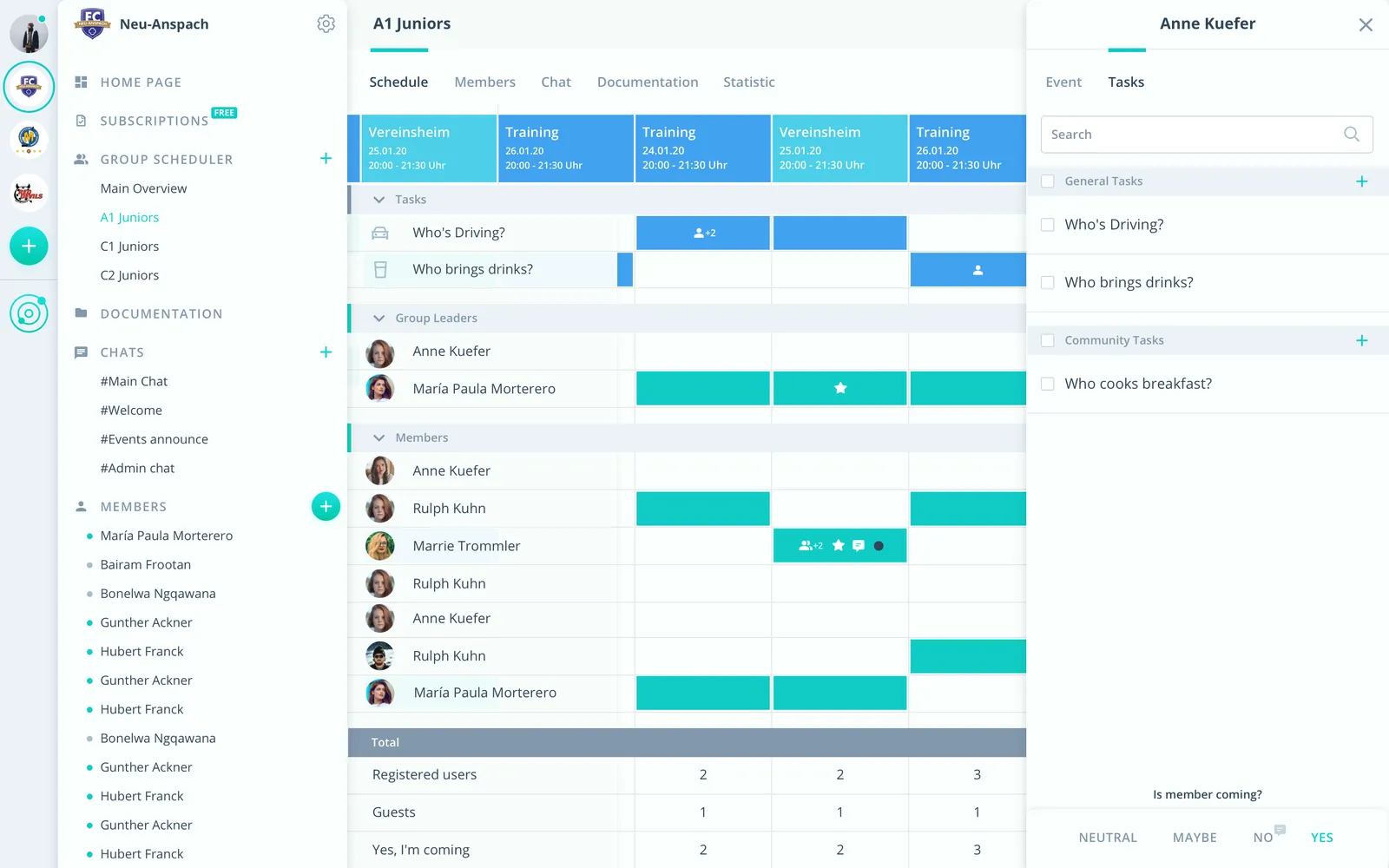
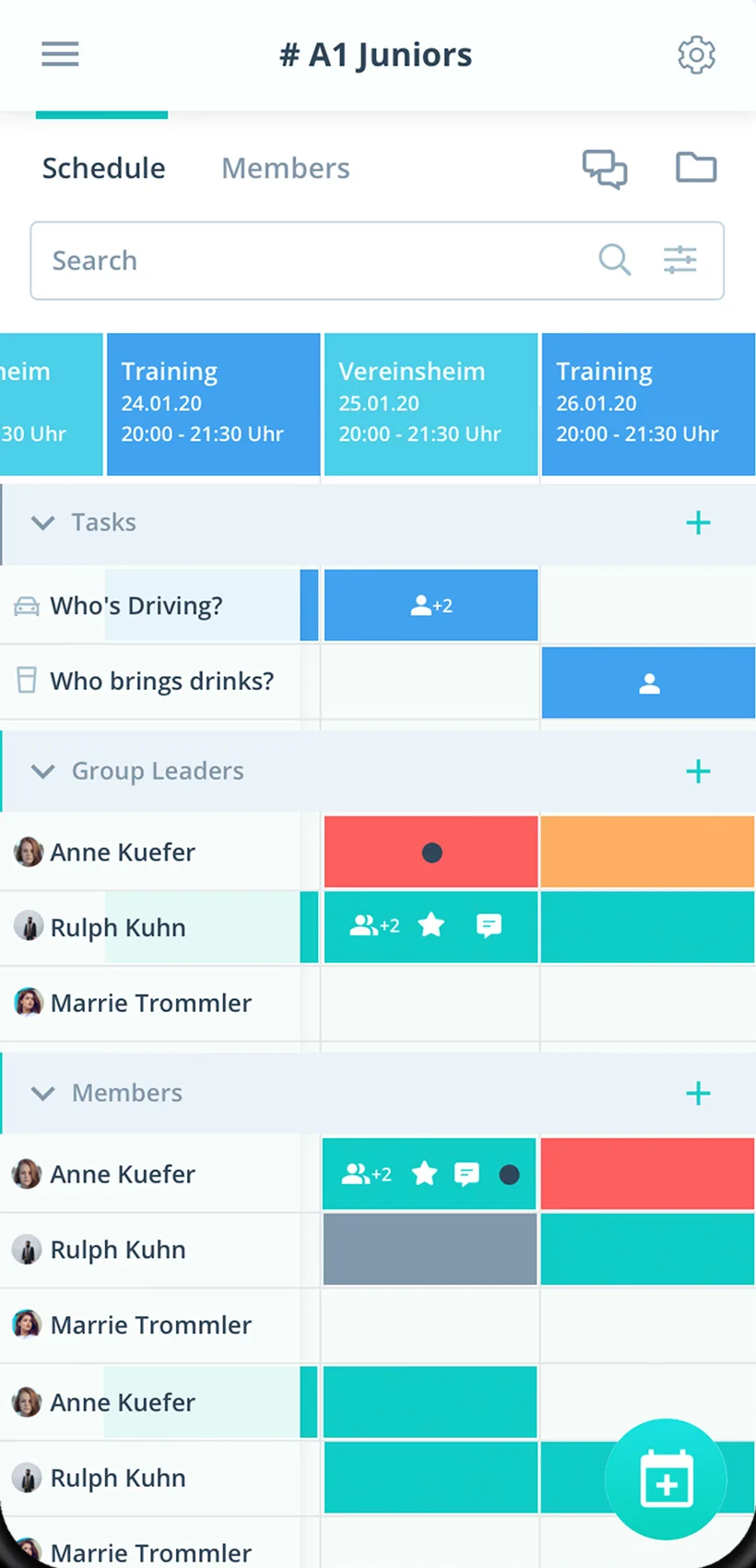
Sign-up with a deadline
See who is coming until the deadline, then plan for real.
Menu choice as a comment
A comment can be required when saying yes, for example for food preferences.
Organizing team with tasks
Decorations, tech and carpools as tasks on the event.
Everything for your company event
For organizers, employees and management. From the team lunch to the summer party.
Event calendar
Holiday dinner, summer party, team outing and lunches in one place.
Sign-up with a deadline
Employees say yes with one click, until the response deadline.
Organizing tasks
Hand out decorations, tech and carpools as tasks on the event.
Mind the absences
See planned absences before you set the date.
A reminder to sign up
Up to two reminders per event, so nobody misses the deadline.
Questions about the event
Sort out travel, dress code and program right on the event.
Program and directions
Store the program, directions and documents on the event.
Departments and sites
Department events in their own group scheduler, company events for everyone.
Rights for the organizing team
Admins manage the company, the organizing team schedules as group leaders.
How your company event gets started
From the invitation to the finished guest list.
- 1
Create the event
Set up an event with a response deadline and invite all employees by link.
- 2
Ask for preferences
Turn on a required comment for menu choices and add organizing tasks.
- 3
See the guest list
After the deadline, every response with its preferences at a glance.
For everyone who joins in
Organizers
- Every sign-up in one place
- Menu choices without a second survey
- Event date by poll
Employees
- Sign up for the event with one click
- Program and directions on the event
- Company events in your own calendar if you like
Management
- Event participation at a glance
- Departments and sites together
- Email caterers and venues
What teams planning events with Gumb say
4.7/54.7 out of 5 stars271 ratings across both platforms25K+ users
Top product for organizing communities
We, an ice hockey club, have been using Gumb for many years. Top customer support and very stable.
With all my hobbies I always had a big muddle. With the Gumb app I can see who is coming when, and I can also ask why not... The layout is very user-friendly and modern. I think the app is very good and recommend it.
Simple and clear to use, everything works perfectly.
Reviews translated from German.
Event organizers and teams that use Gumb
 Swiss Indoors Basel
 Rambaud Events
 Brasilianos Churrasco Catering
 EHC Kloten Stadionorganisation
FAQ: the app for company events
How do I collect sign-ups for a company event?
Set up the event with a response deadline. Employees say yes or no with one click, and you see every answer live in one place.
How do I ask for menu choices or allergies?
In the settings under “Answers” you make a comment mandatory for the yes answer. That way everyone writes their preference right with the sign-up.
How do we find a date or venue?
With an event type called “Poll”. The answer options stand for the choices, and in the scheduler you see right away how people voted.
How do I hand out tasks in the organizing team?
Create tasks such as decorations, tech or carpools and turn them on for the event. Volunteers sign up themselves, or admins assign them.
Can I inform caterers or partners without a Gumb account?
Yes. Emails from the web app reach up to 100 external addresses, such as the caterer or venue. Admins and group leaders send them, and recipients do not see each other.
Can departments plan their own events?
Yes. Every department gets its own group scheduler for its events. Company events for everyone sit in the shared calendar.
How do I plan a team event with 50 people?
Create the event, set a response deadline and send the invitation. You see the yes and no answers in real time, and up to two reminders bring in the responses.
Can companions or guests be registered?
Yes, additional guests can be recorded on the event. The number of guests is in the event calendar export, so you know the total for catering and venue.
How do I see the response rate and who has not answered yet?
On the event you see who said yes or no and who is pending. The event calendar export shows invited people, responses received and the response rate per event.
How do I inform everyone who signed up on short notice?
You send a push notification or email for exactly this event, for example for a change of venue. It goes to the people of this event, even when the app is closed.
Ready for the next company event?
Try Gumb for your company events free for 2 months, with every feature, no credit card and no automatic renewal.